Sudoku notes: how to pencil in candidates without getting lost
· Sudokaki
In short. A candidate is a digit that can still go in a cell. You write it small, in pencil or with the Notes button. Don't note everything from the start: only once scanning stops giving you anything, and first in the cells with two or three options. Every digit you place wipes out the matching candidates around it.
In every tougher grid there comes a moment when you stare at the empty cells and simply can't see a way in. That's when you reach for your torch: tiny pencilled-in digits. Put in the right places, they light up the missing digit, and the thrill of finally placing it is well worth the effort.
This page follows on from the basic techniques. If you're new to the game, start with how to play sudoku instead.
What is a candidate in sudoku?
A candidate is a digit that isn't ruled out yet in an empty cell: it doesn't appear in its row, its column or its box. An empty cell can have anywhere from one to nine candidates. When only one is left, that's the answer.
You write them small inside the cell. People call them notes, candidates or pencil marks.
When should you note candidates?
When scanning and the other basic techniques have run dry. Not before.
- Easy grid: often, you don't need any notes at all. You can spot everything by eye.
- Medium grid: a few notes, in the cells you're unsure about.
- Hard or expert grid: notes become essential, because the advanced techniques (pairs, X-Wing…) are read from the candidates.
Noting the whole grid right from the start is the classic trap: dozens of tiny digits that will almost all disappear within a minute. Done it yourself? Don't worry, we've all been there.
How do you take notes without drowning in them?
Only note the cells that have two or three candidates. A cell with five options isn't telling you anything yet: leave it blank and come back to it later.
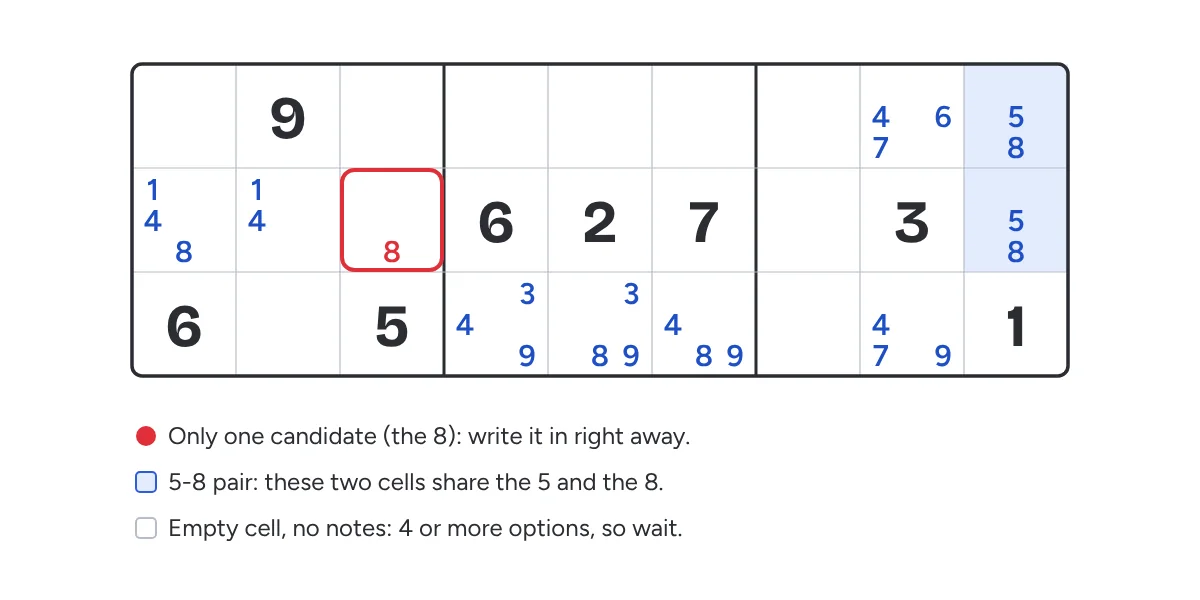
In this slice of the grid (the top three rows):
- One cell has only one candidate: the 8, in row 2, column 3. No need to note it: write it straight in!
- Two cells in column 9 only accept 5 and 8. So those two digits are taken by those two cells: no other cell in the column or the box can hold a 5 or an 8. That's a pair, one of the first advanced techniques.
- Cells with 4 or more options stay empty. You'll note them later.
Three rules for readable notes
- Always put each digit in the same spot: 1 in the top left, 5 in the middle, 9 in the bottom right, like a phone keypad. Your eye then finds a digit without having to read it.
- Note one digit at a time across the whole grid, rather than one cell at a time. It's quicker and you'll miss fewer.
- Check every note: a missing candidate is much worse than an extra one. It can lead you to place a wrong digit you were "sure" of.
What is the corner pairs method?
For each box, you only note a digit if it has just two possible places in that box, written small in the corner of those two cells. The grid stays clean and the pointing patterns jump out at you.
An example with our grid from the basic techniques: in the middle box on the right, the 7 has only two places, in row 6, columns 7 and 8. You write a small 7 in the corner of those two cells. In the centre box, the 7 also has only two places, in row 5 and row 6 of column 5. You see at a glance that row 6 already has its 7 in the box on the right, so the centre box's 7 goes in row 5. That's exactly pointing.
When one of the two places gets filled or ruled out, the other one becomes the answer: you get a digit for free. It's the kind of trick people love showing each other, pencil in hand, over the same grid.
Should you erase notes when you place a digit?
Yes, always, and right away. When you place a digit, it becomes ruled out in its whole row, its whole column and its whole box. So you need to remove it from the notes in those cells.
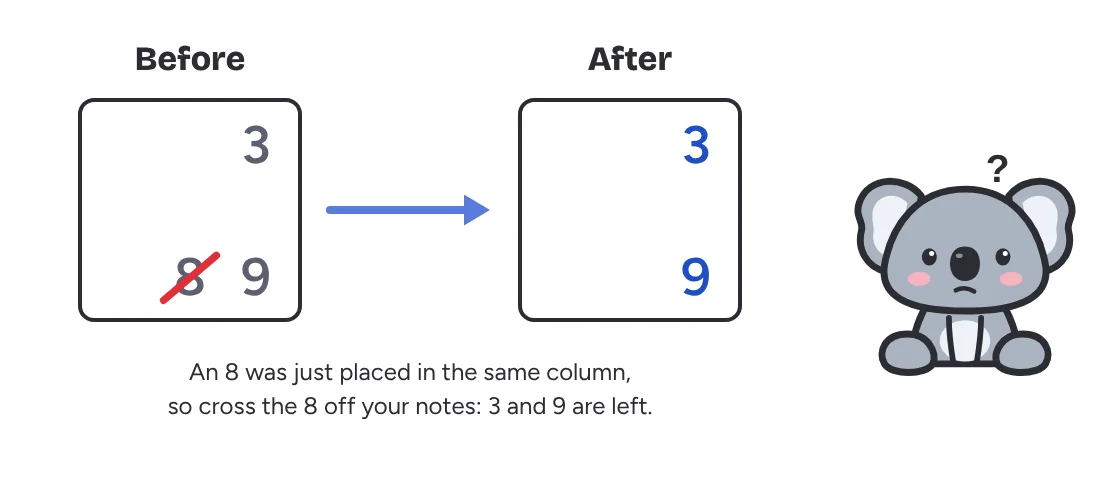
In this example, the cell (row 3, column 5) had three candidates: 3, 8 and 9. An 8 has just been placed further down the same column. The 8 disappears from the notes, leaving 3 and 9. The cell is now a pair, which is much more useful.
Forgetting this tidy-up is mistake number one: you think you have a choice that's no longer there.
How do you use Sudokaki's Notes button?
In all of Sudokaki's games (from 4×4 to 16×16, plus Jigsaw sudoku, cat sudoku and dog sudoku):
- Tap Notes (or press N on the keyboard). The button lights up.
- Pick an empty cell, then tap the possible digits: they're written small. Tap a digit a second time to remove it.
- Tap Notes again to go back to big digits.
Two handy helpers:
- The tidy-up is automatic: when you place a digit, Sudokaki removes it from the notes in its row, its column and its box. Nothing to forget.
- Your notes are saved with your game, on your device, even if you close the page.
The notes are yours to write: the game doesn't fill them in for you. Taking notes is how you learn to see. The first few grids take a little while, then your fingers find their rhythm.
🐨 Kaki's tip: tap a cell where a digit is already placed. That digit lights up everywhere in the grid. In the classic 9×9 sudoku, it lights up in your notes too. Perfect for checking at a glance where a candidate is still possible.
And on paper?
- Pencil for notes, pen for the digits you're sure of, and a soft rubber so you don't wear a hole in the page.
- Write small and always in the same spot, using the phone keypad rule.
- Print big: one grid per page leaves room for notes. On the printable sudoku page, you can choose 1, 2 or 4 grids per A4 sheet, with the solutions.
Your turn
Start a classic 9×9 sudoku on Medium and try the method: no notes as long as scanning works, then only in the cells with two or three candidates. Once it feels natural, move up to Hard: finishing your first Hard grid thanks to your notes is a proper moment of pride.
Know someone who notes everything from the very start? Challenge them on the Daily sudoku, send them your time, then compare your methods. The best sudoku conversations often start with "Wait, how did you find that 7?". And if you're wondering why this little ritual feels so good, read the benefits of sudoku.
Next page: Advanced techniques, to put your notes to work with pairs, the X-Wing and the Y-Wing.
Frequently asked questions
What is a candidate in sudoku?
It's a digit that can still go in an empty cell, because it isn't in its row, its column or its box. You write it small inside the cell.
Should you note every candidate?
No. Start by noting the cells with two or three candidates. Noting everything is only useful for very hard grids, and only once the basic techniques stop giving you anything.
Does Sudokaki fill in the notes automatically?
No, you write your own notes. However, when you place a digit, Sudokaki automatically erases it from the notes in the same row, the same column and the same box.
How do you take pencil notes without making a mess?
Always write each digit in the same spot in the cell (1 in the top left, 9 in the bottom right), use a pencil and a rubber, and keep the pen for the digits you're sure of.