Stuck on a sudoku? What to do, step by step
· Sudokaki
In short. When you're stuck on a sudoku, don't guess. First check there's no mistake, then scan the whole grid again, digit by digit, from 1 to 9. Update your notes and look for pointing. If nothing turns up, take a break: fresh eyes often spot it in a minute.
You're reading the same row for the tenth time, your tea's gone cold, and the grid seems to be laughing at you. Every solver knows that little twinge of frustration, and it often strikes just before the grid gives in. The digit that unlocks everything then brings a joy you'd never have felt if it had all been plain sailing.
Everyone gets stuck, even the best. If you can't see a way forward, either a digit slipped past you or there's a technique you don't know yet. This page helps you work out which.
What should you do when you're stuck on a sudoku?
Follow this checklist in order, and start over from the top as soon as you place a digit.
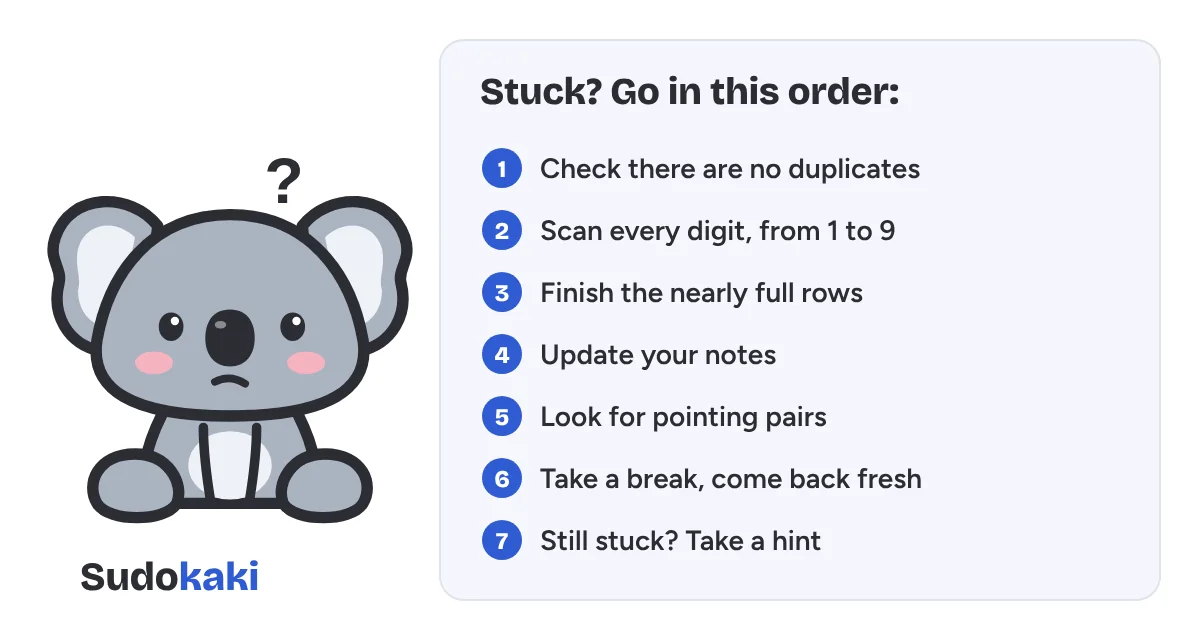
- Check there are no duplicates. Go through every row, every column and every box: one doubled digit, and everything after it is wrong.
- Scan every digit, from 1 to 9. Not just the ones that "look" useful: it's often the forgotten digit that unlocks everything. The method is explained in the basic techniques.
- Finish the nearly full rows. A row, a column or a box that's only missing two or three digits: for each empty cell, ask yourself which digit can go where.
- Update your notes. Remove the candidates that have become impossible and look for cells with only one left.
- Look for pointing. A digit stuck on a single row of a box rules it out in the rest of that row. It's often the key to medium grids.
- Take a break. Get up, put the kettle on, come back in ten minutes.
- Still stuck? Take a hint, or learn a new technique in the advanced techniques.
🐨 Kaki's tip: when you scan, say the digit under your breath ("the 4s… the 5s…"). It sounds daft, but it stops your eye skipping a digit.
What are the most common mistakes?
Three mistakes are behind almost every time you get stuck.
1. The duplicate you didn't see
You wrote a digit that's already in the same row, column or box, often far away, at the other end of the grid. As long as it stays there, the digits that follow from it are wrong, and the grid eventually becomes impossible.
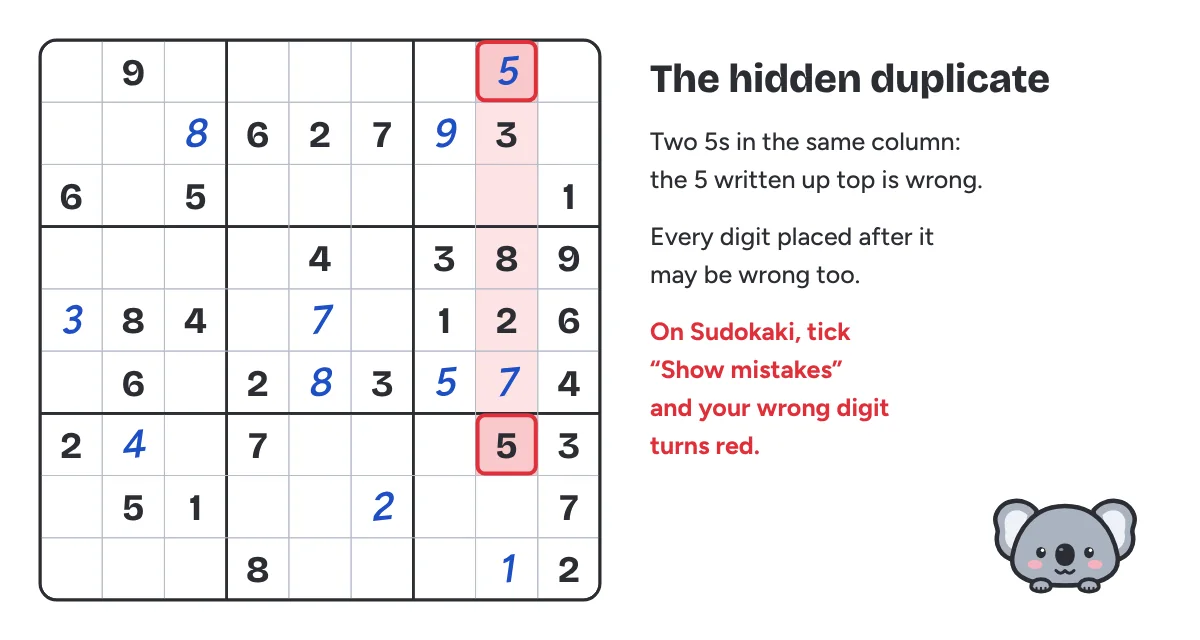
Here, the 5 written in row 1, column 8 is wrong: column 8 already has a 5, six rows down, in another box. Easy to miss.
How to avoid it: before writing a digit, check all three areas (row, column, box), not just the one that gave you the idea.
2. The missing candidate
You noted "3 or 7" in a cell, when the 9 was also possible. Later, you rule out the 3, write the 7… and it was the 9. A missing candidate is more dangerous than an extra one: it creates false certainties.
How to avoid it: note one digit at a time across the whole grid, and double-check cells with two candidates before relying on them.
3. The digit placed too fast
"It's probably a 6": when you write a digit without being able to say why it's the only one possible, it's a bet. It's wrong half the time, and you won't find out until ten digits later.
How to avoid it: before writing, put the reason into one sentence. "The 6 goes here because it's the only free spot in the box." If you can't, don't write it.
Should you guess in sudoku?
No. Guessing doesn't save time: it just moves it. If your bet is wrong, the mistake doesn't show right away. Everything falls apart ten or twenty digits later, and you have to start all over again.
Above all, a well-made grid has only one solution, and you can always reach it with logic. Every Sudokaki grid is checked to have a single solution. So when you're stuck, there's always a line of reasoning you haven't seen yet. That's what you should look for, and looking for it is how you improve. And the day you find it without help, you'll be grinning about it all day.
How can Sudokaki help?
Sudokaki's games have four tools to get you unstuck without spoiling the game:
| Tool | What it does | When to use it |
|---|---|---|
| Show mistakes | A checkbox under the grid. Your wrong digits show up in red. | For learning. Untick it for a real challenge. |
| Hint | Three per game. Fills the chosen cell with the right digit. If that cell is already correct, the hint first fixes one of your mistakes or, if there aren't any, fills the easiest cell. | As a last resort, after the checklist. |
| Undo | Goes back one move at a time (also Ctrl+Z on the keyboard). | To go back to a mistake. |
| Restart | Clears the grid (your digits, your notes, your hints) and keeps the starting grid. | When there are too many mistakes to track down. |
A tip: before taking a hint, tick Show mistakes. Very often, it wasn't the logic that had you stuck but a wrong digit, and fixing it is enough to get going again.
🐨 Kaki's tip: when a hint gives you a digit, ask yourself why it was that one. It's the best way to learn the technique you were missing.
Why does taking a break work?
Because tired eyes keep rereading the same cells. You follow the same paths and miss the same digits. A few minutes off "resets" your gaze, and the missing digit often jumps out at you when you come back.
On Sudokaki, your game is saved automatically on your device, with your notes and your timer. You can close the page and come back later, even the next day. Kaki keeps your grid safe and warm. Knowing when to put your pencil down is part of the fun: a challenge without stress is exactly one of the benefits of sudoku.
Your turn
To practise without any pressure, start a classic 9×9 sudoku on Medium with "Show mistakes" ticked. Fancy a shorter game? A 6×6 sudoku takes just a few minutes.
And don't battle a stubborn grid on your own. Play the Daily sudoku, send your time to a friend or a family member on WhatsApp or by text: you're playing exactly the same grid. If one of you gets stuck, the other can whisper a clue without giving the game away. With two of you, being stuck turns into a chat.
To go over the whole method from the start: how to play sudoku. To see why some grids put up more of a fight than others: the difficulty levels.
Frequently asked questions
Can a sudoku grid be impossible?
Not a well-made one: it has a single solution, which you can find with logic. If your grid seems impossible, there's almost always a mistake further up, often a duplicate. Tick "Show mistakes" to find it.
How many hints do you get per game on Sudokaki?
Three. A hint fills the cell you chose with the right digit, or fixes one of your mistakes if the chosen cell is already correct.
Is using a hint cheating?
No. It's a learning tool. The most useful thing is to then work out why that digit was the only one possible.
Do you have to restart the grid when you make a mistake?
Not necessarily. First use Undo to go back to the mistake. If you can't find it, Restart clears the grid and lets you start again cleanly.
What should I do if I'm stuck on a hard grid?
Hard and Expert grids call for extra techniques: pairs, X-Wing, Y-Wing. They're explained step by step in the advanced techniques.